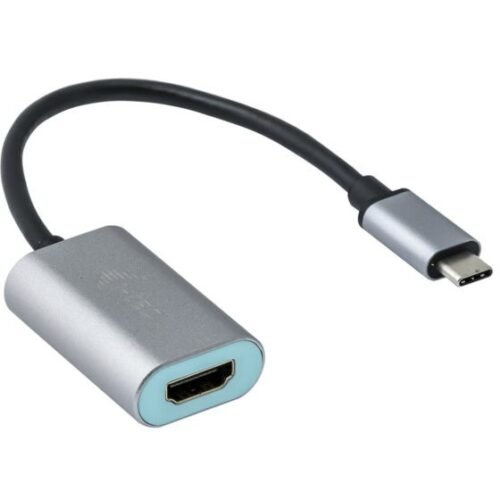


D I-TEC USB-C METAL HDMI ADAPTER
€40.13
i-tec Metal USB-C HDMI Adapter 4K/60Hz, 0.15 m, USB Type-C, HDMI, Male, Female, 3840 x 2160 pixels
- Description
- Additional information
Description
i-tec Metal USB-C HDMI Adapter 4K/60Hz. Cable length: 0.15 m, Connector 1: USB Type-C, Connector 2: HDMI. Weight: 27 g, Width: 45 mm, Depth: 30 mm. Packaging width: 145 mm, Packaging depth: 130 mm, Packaging height: 25 mm. Quantity per package: 1 piece(s)
The adapter is suitable for all laptops and smartphones that have a USB-C connector for video transmission (DisplayPort alt mode) or a Thunderbolt 3 connector. The adapter is suitable for use with Chromebook Pixel 2015, Acer Switch Alpha 12, Dell XPS 13, HP EliteBook Folio G1, and other devices with a USB-C connector. This connector has many advantages – it's small and symmetrical, which allows for easy connection, as you don't have to worry about twisting the connector.
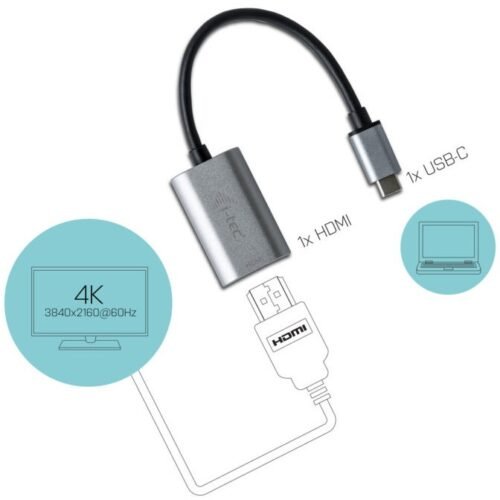
It's very easy to use; simply plug the adapter into your computer's USB-C or Thunderbolt 3 port, connect it to your display device using an HDMI cable, and you're ready to use. The drivers are installed automatically by the system.
Expand your workspace with an external DisplayPort monitor via the new USB-C or Thunderbolt 3 connector. This cable adapter supports 4K Ultra HD resolutions up to 3840×2160 at 60 Hz, plus audio. The cable adapter is ideal for planners, graphic designers, gamers, and other users who want or need to work with multiple displays simultaneously.
Expand your workspace with an external HDMI display or connect a projector or TV with HDMI interface to your notebook, tablet, or PC via the new USB-C or Thunderbolt 3 connector. The adapter supports transmission of 4K Ultra HD resolution up to 3840 x 2160 @60Hz plus audio signal.
The adapter is designed for use with the Chromebook Pixel 2015, Acer Switch Alpha 12, Dell XPS 13, HP EliteBook Folio G1, and other devices with a USB-C connector. This connector has many advantages – it's small and symmetrical, making it easy to connect without having to worry about twisting the connector.
The adapter is ideal for planners, graphic designers, gamers, and other users who want or need to work with multiple monitors simultaneously. Using the “Extend” and “Mirror” modes, you can, for example, work with wide spreadsheets displayed across two monitors, work on one monitor while browsing the internet on the other, compare multiple documents simultaneously without having to switch between multiple open windows, display panoramic images on two monitors, view graphics and current data simultaneously, show multiple presentations at once without the need for another computer, and more.
It's very easy to use: simply plug the adapter into your computer's USB-C or Thunderbolt 3 port, connect it to your display using an HDMI cable, and you're ready to use. The drivers are installed automatically by the system.
Please carefully check the device compatibility to ensure it complies with the operating requirements of the i-tec product in question, especially the video output (Display Port Alt Mode profile) and, if applicable, the charging function (Power Delivery). If the device is not compatible, your new i-tec product may malfunction. Detailed specifications for your device, or the USB port, can be found in the user manual included with your notebook/tablet/smartphone. You may also want to contact the device manufacturer's customer service.
Additional information
| Cable length | |
|---|---|
| Connection 1 | |
| Connection 2 | |
| Connector 1 gender | |
| Connector 2 sex | |
| Maximum resolution | |
| Supported video modes | |
| Maximum refresh rate | |
| Product color | |
| Color depth | 24 bit |
| Characteristic | Operating manual, Supports Mac operating systems, Supports Windows operating systems |
| Support for other operating systems | Android |
| Weight | |
| Broad | |
| Depth | |
| Height | |
| Packaging width | |
| Packaging depth | |
| Packing height | |
| Package weight | |
| Packaging type | |
| Quantity per pack | |
| Goods tariff number (HS) | 84733080 |
| Manufacturer |